Overview
Cedreo is a powerful 3D home design software specifically tailored for architects, home builders, and interior designers. It provides a comprehensive suite of tools and features that facilitate the creation of realistic 3D models and visualizations of residential buildings. With Cedreo, professionals can streamline their design process, enhance collaboration, and present their projects in a visually compelling manner.
Cedreo scores
Summary
Cedreo is a reliable and feature-rich 3D home design software that empowers professionals to bring their architectural visions to life. With its robust design capabilities, collaborative features, and customization options, Cedreo offers an efficient and effective solution for creating captivating designs and communicating them with clients and stakeholders.
Purpose and Target Audience
Cedreo aims to assist professionals in the construction and design industries by providing them with a user-friendly platform to create accurate and detailed representations of architectural designs. Whether you’re an architect looking to communicate your vision to clients or a home builder seeking to optimize construction planning, Cedreo offers the necessary tools and capabilities. Its features cater to both experienced designers and beginners in the field, making it accessible to a wide range of users.
Key Features and Benefits
Cedreo boasts a variety of key features that set it apart from other 3D home design software options. Some of its notable features include:
Intuitive and user-friendly interface for easy navigation and efficient design creation.
Extensive object library with a wide range of pre-designed objects and materials, allowing users to furnish and decorate their virtual spaces realistically.
Advanced 3D modeling and rendering capabilities that provide high-quality visualizations for presentations and client communication.
Collaboration tools that enable team members and clients to contribute and provide feedback, fostering efficient communication throughout the design process.
User Interface and Ease of Use
A. Intuitive Design and Navigation
Cedreo’s user interface is thoughtfully designed with a focus on simplicity and ease of use. The layout is intuitive, allowing users to quickly find and access the various tools and features they need. The navigation is smooth and straightforward, making it easy to create floor plans, add objects, and modify designs effortlessly.
B. Customization Options
Cedreo offers a range of customization options to cater to different design preferences and requirements. Users can adjust room layouts, dimensions, and architectural elements with precision. Additionally, the software allows customization of materials, colors, and textures, ensuring that every design reflects the desired aesthetic and style.
C. Learning Curve and User Support
Cedreo is designed to be user-friendly, even for those who may be new to 3D home design software. The learning curve is relatively gentle, and the software provides helpful tutorials and guides to assist users in mastering its features. Cedreo also offers responsive customer support to address any questions or issues that may arise during the design process.
Design Capabilities
A. 2D Floor Plan Creation
- Tools for Creating Floor Plans
Cedreo provides a comprehensive set of tools for creating accurate and detailed 2D floor plans. Users can easily draw walls, define room dimensions, and adjust the layout with precision. The software offers features like snap-to-grid functionality and alignment guides to assist in creating symmetrical and well-proportioned floor plans. - Flexibility in Room Layout and Dimensions
Cedreo allows users to customize room layouts and dimensions to meet their specific design requirements. Walls can be easily moved, added, or removed, enabling the creation of unique and personalized floor plans. Additionally, users can specify precise measurements for each room, ensuring accuracy and adherence to building codes and regulations.
B. 3D Modeling and Visualization
- Ability to Create 3D Models of Buildings
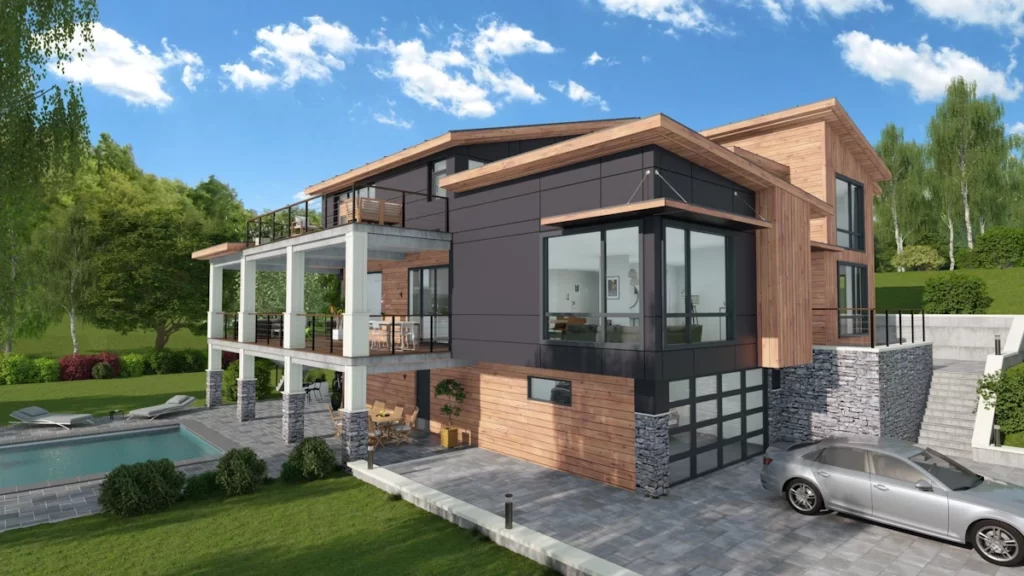
Cedreo excels in its 3D modeling capabilities, allowing users to transform 2D floor plans into realistic and immersive 3D models. Users can extrude walls, add roofs, and apply textures to surfaces, creating a lifelike representation of the building. The software also enables the creation of multi-story structures, showcasing the vertical dimensions of the design. - Realistic Rendering and Visualization Options
Cedreo offers advanced rendering capabilities to produce high-quality and realistic visualizations of architectural designs. Users can apply lighting effects, shadows, and reflections to enhance the realism of the rendered images. The software also supports the use of various materials and textures, allowing users to create accurate representations of different building materials like wood, concrete, or glass.
C. Object Library
- Availability and Variety of Pre-designed Objects and Materials
Cedreo provides an extensive object library that includes a wide range of pre-designed objects, furniture, fixtures, and materials. Users can easily browse and select items from the library to furnish and decorate their virtual spaces. The collection covers various architectural styles and design preferences, ensuring that users have access to a diverse set of options. - Customization Options for Objects and Materials
In addition to the pre-designed objects, Cedreo allows users to customize and modify the appearance of objects and materials. Users can adjust colors, textures, and sizes to match their desired design aesthetics. This flexibility enables users to create personalized and unique designs, tailoring every aspect to meet specific project requirements.
Pricing and Plans
A. Overview of Available Pricing Options
Cedreo offers flexible pricing plans to cater to the needs of different users. The pricing structure typically includes multiple tiers or packages with varying features and capabilities. It’s important to note that specific pricing details may change over time, so it’s recommended to visit Cedreo’s official website for the most up-to-date information.
B. Features and Limitations of Each Pricing Tier
- Basic/Free Plan
Cedreo may offer a free plan with limited features, allowing users to explore the software and its basic functionalities. This plan is often ideal for individual users or those looking to get a feel for the software before committing to a paid plan. However, it may have certain limitations in terms of available object libraries, project storage capacity, or rendering quality. - Pro/Premium Plan
Cedreo’s Pro or Premium plan typically includes a comprehensive set of features and capabilities suitable for professional users. This plan may offer access to the complete object library, enhanced rendering options, collaboration tools, and additional customization features. It often provides increased project storage capacity and may offer priority customer support. - Enterprise/Custom Plan
Cedreo may also provide enterprise or custom plans tailored to the specific requirements of larger organizations or teams. These plans may include additional features such as multi-user collaboration, advanced project management tools, dedicated customer support, and integration options with other software platforms. The pricing for enterprise plans is usually customized based on the organization’s needs and scale of operations.
C. Value for Money and Cost-effectiveness
When considering the pricing of Cedreo, it’s essential to evaluate the value for money and cost-effectiveness in relation to your specific requirements. Consider factors such as the software’s comprehensive feature set, ease of use, quality of renderings, object library, and customer support. Assess how well Cedreo aligns with your workflow and if the pricing plans provide a good return on investment for your design projects.
Pros and Cons
A. Pros
- Intuitive Interface: Cedreo offers a user-friendly interface that is easy to navigate, making it accessible to both experienced designers and beginners in the field.
- Extensive Object Library: The software provides a diverse collection of pre-designed objects and materials, allowing users to quickly furnish and decorate their virtual spaces with a wide range of options.
- Advanced 3D Modeling and Rendering: Cedreo excels in creating detailed and realistic 3D models of buildings, along with high-quality rendering capabilities that produce visually stunning visualizations for presentations and client communication.
- Collaboration Tools: Cedreo offers collaboration features that enable seamless teamwork and effective communication among team members and clients, facilitating smooth project management and design collaboration.
- Customization Options: Users have the flexibility to customize room layouts, dimensions, objects, and materials, allowing for personalized and unique designs that reflect specific project requirements and design aesthetics.
B. Cons
- Learning Curve: While Cedreo is designed to be user-friendly, some users may still experience a learning curve when initially using the software, especially if they are new to 3D home design tools. However, the availability of tutorials and customer support can help users overcome this hurdle.
- Pricing: The cost associated with Cedreo’s paid plans may be a consideration for some users, particularly those on a limited budget or who require only basic features. It’s important to carefully evaluate the pricing options and determine if the features and capabilities justify the investment for your specific needs.
- Platform Limitations: Cedreo may have platform limitations, such as compatibility with specific operating systems or hardware requirements. Users should ensure that their devices meet the software’s specifications to avoid any potential compatibility issues.
Conclusion
A. Summary of Cedreo’s Main Features and Benefits
Cedreo is a powerful 3D home design software that caters to architects, home builders, and interior designers. With its intuitive interface, extensive object library, and advanced 3D modeling capabilities, Cedreo offers users the tools they need to create accurate and visually stunning representations of architectural designs. The software’s collaboration features and customization options further enhance the design process and facilitate effective communication with team members and clients.
B. Overall Recommendation or Rating
Cedreo is highly recommended for professionals in the construction and design industries who are seeking a comprehensive solution for their 3D home design needs. Its user-friendly interface, rich object library, and realistic rendering capabilities make it a valuable tool for creating impressive visualizations and presentations. While there may be a learning curve for new users, the available tutorials and customer support help users overcome this hurdle. When considering the pricing options, it’s essential to evaluate the value for money based on the specific requirements and benefits offered by Cedreo.
Our rating: 4.5/5
Want to try Cedreo?